The Best Open-Source and Open-Weight AI Models for OCR
Table of Contents
- Introduction
- Understanding open-source vs. open-weight
- Quick comparison: leading OCR models
- How to choose the right OCR model
- Leading open-source and open-weight OCR models
- Benchmark data and performance
- Running models at home: power requirements
- Where to get the models
- Cost considerations and setup examples
- Conclusion
Introduction
Optical Character Recognition (OCR) turns the text in images and documents into something a computer can read and search. People use it to digitize old books and to automate data entry. In recent years, open-source and open-weight OCR models have gotten good enough to cover most of those use cases without a paid API. They are flexible, transparent, and cheap to try, whether you are an individual developer or part of a large enterprise. This guide walks through the main open-source and open-weight OCR models, how well they perform, what hardware they need, and who built them, so you can pick one for a personal computer or for a production system.
Understanding open-source vs. open-weight
The terms “open-source” and “open-weight” get used loosely, and they mean different things for AI models:
Open-Source Models: These models come with their complete source code, so you can inspect, modify, and redistribute the software. That openness makes community collaboration and long-term maintenance easier, and anyone can audit the code for security.
Open-Weight Models: For these models, only the trained model weights are public. The training code or the full development pipeline might stay proprietary, so you can run and fine-tune the models but cannot modify the architecture or study the training pipeline in depth. Companies often release them to get developers building on their pre-trained models.
Both categories beat closed, proprietary solutions on accessibility, customization, and cost, and they avoid hefty licensing fees and vendor lock-in.
Quick comparison: leading OCR models
The table below is a quick overview to help you shortlist candidates:
| Model | Type | Languages | GPU Required | Min VRAM | Best For | License |
|---|---|---|---|---|---|---|
| Tesseract | Traditional ML | 100+ | No | 0GB | General documents, printed text | Apache 2.0 |
| EasyOCR | Deep Learning | 80+ | Recommended | 2GB | Quick Python integration | Apache 2.0 |
| PaddleOCR | Deep Learning | 80+ | Recommended | 4GB | Chinese text, complex documents | Apache 2.0 |
| DocTR | Deep Learning | Multiple | Optional | 2GB | Flexible OCR pipeline | Apache 2.0 |
| TrOCR | Transformer | Multiple | Yes | 6GB | Handwritten text | MIT |
| Donut | Transformer | Multiple | Yes | 16GB | Document understanding | MIT |
| Qwen2.5-VL | LLM | Multiple | Yes | 6-80GB | Complex visual understanding | Apache 2.0 |
| Llama 3.2 Vision | LLM | Multiple | Yes | 2-30GB | General vision-language tasks | Llama 2 Community |
| Moondream2 | Small LLM | Multiple | Optional | 1GB | Edge devices, low resource | Apache 2.0 |
How to choose the right OCR model
If you have no GPU or limited hardware
- Tesseract: Best for basic printed text extraction
- Moondream2: For simple visual understanding tasks
If you have a consumer GPU (4-8GB VRAM)
- EasyOCR: Quick setup, good general performance
- PaddleOCR: Better for Asian languages and complex layouts
- TrOCR: When you need handwriting recognition
If you have high-end hardware (16GB+ VRAM)
- Qwen2.5-VL: State-of-the-art performance, complex documents
- Donut: OCR-free document understanding
- Llama 3.2 Vision: General vision-language capabilities
By use case
- Simple text extraction: Tesseract, EasyOCR
- Handwritten notes: TrOCR, Qwen2.5-VL
- Complex documents/forms: PaddleOCR, Donut, Qwen2.5-VL
- Real-time applications: EasyOCR, Moondream2
- Multilingual content: PaddleOCR, Qwen2.5-VL
Leading open-source and open-weight OCR models
The profiles below are grouped by the technology each model is built on. That tends to decide what a model is strong at and what hardware it needs.
Traditional machine learning-based OCR models
These models rely on classical computer vision and machine learning for text detection and recognition. They are usually lightweight and run on modest hardware, so local deployment is realistic.
Tesseract OCR
Tesseract is arguably the best-known open-source OCR engine. Hewlett-Packard originally developed it, Google sponsored it later, and it has years of development behind it with an active community. It is accurate on printed text and supports over 100 languages.
Want to try Tesseract without installation? Visit ocrmd.com/about to try Tesseract.js completely client-side in your browser. For more advanced OCR capabilities, you can also try OCRMD’s premium models with 30 free image/PDF extractions when you sign up! (Disclosure: OCRMD is developed by the author of this blog post)
- Key Features: Supports 100+ languages, LSTM-based, extensive documentation, Apache 2.0 license.
- Best For: General document processing, especially printed text.
- Hardware Requirements: Relatively low. A dual-core processor with 2 GHz and 2 GB of RAM is a minimum, with a quad-core processor and at least 4 GB of RAM recommended for larger text files. Tesseract is primarily CPU-based, with limited GPU support via OpenCL drivers.
- Source: GitHub
- Developed by: Originally Hewlett-Packard Laboratories, later sponsored by Google.
EasyOCR
EasyOCR is a Python library built for quick integration. It supports over 80 languages and several writing scripts, so it covers a wide range of applications. The deep learning models run on PyTorch.
- Key Features: Python API, 80+ languages, PyTorch-based, Apache 2.0 license, no handwritten text support yet.
- Best For: Quick integration in Python projects.
- Hardware Requirements: Benefits significantly from GPU acceleration. A modern NVIDIA GPU with CUDA support is recommended for optimal performance. It also requires a CPU that supports the AVX2 instruction set. Minimum 2 GB RAM to run an Open eVision application, 8 GB RAM to compile.
- Source: GitHub
- Developed by: Jaided AI.
PaddleOCR
PaddleOCR, developed by Baidu, is an OCR toolkit with high accuracy, especially on Chinese and English text. It covers text detection, recognition, and structured document analysis, including layout analysis and table/formula recognition.
- Key Features: PP-OCRv4 (high accuracy for Chinese/English), 80+ languages, layout analysis, table/formula recognition, Apache 2.0 license.
- Best For: Complex document processing, especially Chinese text and structured documents.
- Hardware Requirements: Running PaddleOCR on GPU significantly accelerates processing speed. Requires CUDA for GPU installation. While specific minimums are not strictly defined, user examples suggest configurations like Windows 10 Pro 64-bit, Intel Core i5-9500 CPU, 64 GB RAM, and NVIDIA GeForce RTX 2060 6GB GPU for efficient use.
- Source: GitHub
- Developed by: PaddlePaddle (Baidu).
DocTR
DocTR (Document Text Recognition) is an open-source library from Mindee for OCR tasks. It bundles several text detection and recognition architectures and runs on both PyTorch and TensorFlow.
- Key Features: Multiple text detection/recognition architectures, PyTorch/TensorFlow support, Apache 2.0 license.
- Best For: Flexible OCR pipeline.
- Hardware Requirements: GPU support is available, often facilitated through Docker images for easier setup.
- Source: GitHub
- Developed by: Mindee.
Large language model (LLM)-based OCR models
Large language models changed OCR by moving past text extraction toward understanding the document itself. They usually handle complex layouts, context, and even handwriting better than traditional OCR engines.
Microsoft TrOCR
TrOCR (Transformer-based Optical Character Recognition) is an end-to-end text recognition model from Microsoft Research. Its Transformer architecture makes it especially good at handwritten text.
- Key Features: Transformer-based, strong handwriting recognition, MIT license.
- Best For: Handwritten text recognition.
- Hardware Requirements: Requires GPU for efficient inference. Users have reported memory issues with 10GB GPU memory for fine-tuning, which suggests higher VRAM for training. As a Transformer-based model, it benefits significantly from GPU acceleration.
- Source: Hugging Face
- Developed by: Microsoft Research.
Donut
Donut (Document Understanding Transformer) is an OCR-free document understanding model from Clova AI. It works without a traditional OCR pipeline, which is why it handles structured documents so well.
- Key Features: OCR-free document understanding, strong performance on structured documents, MIT license.
- Best For: Document understanding without traditional OCR pipeline.
- Hardware Requirements: A GPU with at least 16GB of memory (e.g., NVIDIA RTX 3090) is recommended for fine-tuning. For inference, it can run on CPU with 32GB RAM and a 12th Gen Intel Core i9, but it will be slower (3-4 seconds per image).
- Source: GitHub
- Developed by: Clova AI (LINE Corporation).
Qwen2.5-VL
Qwen2.5-VL is a multimodal large language model series from Alibaba Cloud’s Qwen team. It reads complex layouts accurately, understands images and text together, and supports multiple languages.
- Key Features: Multimodal, advanced visual language understanding, high accuracy on complex layouts, multiple languages, Apache 2.0 license.
- Best For: Complex visual language understanding tasks.
- Hardware Requirements: Requires significant VRAM. For example, Qwen2.5-VL-3B needs 11.5 GB (FP32) or 5.75 GB (BF16), while the 7B model requires 26.34 GB (FP32) or 13.17 GB (BF16). NVIDIA A6000 (48GB), A100 (80GB), H100 (80GB) are recommended for larger models, though an RTX 4090 (24GB) can run the 7B model. Minimum 32GB RAM (64GB or more for vision-intensive tasks), and a powerful CPU (e.g., AMD EPYC 64-core / Intel Xeon 32-core for larger models) are also recommended. At least 50GB free SSD space is needed.
- Source: GitHub, Hugging Face
- Developed by: Qwen team, Alibaba Cloud.
Llama 3.2 Vision
Llama 3.2 Vision, from Meta AI, is a collection of instruction-tuned image reasoning generative models. It covers general visual understanding, contextual text extraction, and multiple languages, so it fits combined visual and language tasks.
- Key Features: General visual understanding, contextual text extraction, multiple languages, Llama 2 Community License (open-weight).
- Best For: Combined visual-language tasks.
- Hardware Requirements: Requires GPU for inference. VRAM requirements vary by model size: Llama 3.2 1B needs 2.3GB (NVIDIA GTX 1650), 3B needs 6.9GB (NVIDIA RTX 2060), and 11B Vision needs ~10 GB (4-bit mode) or >30 GB (without quantization). At least 16GB RAM is recommended.
- Source: Hugging Face, Meta AI Blog
- Developed by: Meta AI.
Mistral OCR
Mistral OCR, from Mistral AI, reads each element of a document, from media to text, tables, and equations, with high accuracy. It is offered mainly as an API, but enterprises can self-host it using Mistral’s open-source models.
- Key Features: High accuracy in document understanding, handles various document elements, API-first with self-hosting options.
- Best For: Enterprise-grade document analysis and complex data extraction.
- Hardware Requirements: Recommended 16GB VRAM for full precision (for Mistral 7B, which Mistral OCR is based on). Can run on CPU only, but slower.
- Source: Mistral AI
- Developed by: Mistral AI.
Moondream2
Moondream2 is a small but capable open-source vision language model built for edge devices with very little memory. It puts strong image understanding into a remarkably small footprint.
- Key Features: Small size, efficient, strong image understanding, open-source.
- Best For: Edge device deployment, resource-constrained environments.
- Hardware Requirements: Designed for efficiency, can run on devices with limited memory. Specific detailed requirements are less stringent than larger LLMs.
- Source: GitHub, Hugging Face
- Developed by: Vikhyat Korrapati (Moondream).
Idefics2
Idefics2 is an open-source multimodal model from Hugging Face for general visual understanding and reasoning tasks, including reading text in images.
- Key Features: Multimodal, general visual understanding, open-source.
- Best For: Research and applications requiring broad visual reasoning capabilities.
- Hardware Requirements: Similar to other LLM-based models, benefits from GPU acceleration, with VRAM requirements depending on the model size and precision.
- Source: Hugging Face
- Developed by: Hugging Face.
Benchmark data and performance
OCR models are usually compared on accuracy, speed, and how well they handle different kinds of text and document layouts. The two charts below come from recent benchmark studies, one on general OCR accuracy and one on JSON extraction.
Roboflow: average accuracy across domains
The following chart illustrates the average accuracy of various OCR models across different domains, as benchmarked by Roboflow. This benchmark focuses on non-document OCR applications, such as localized text examples.
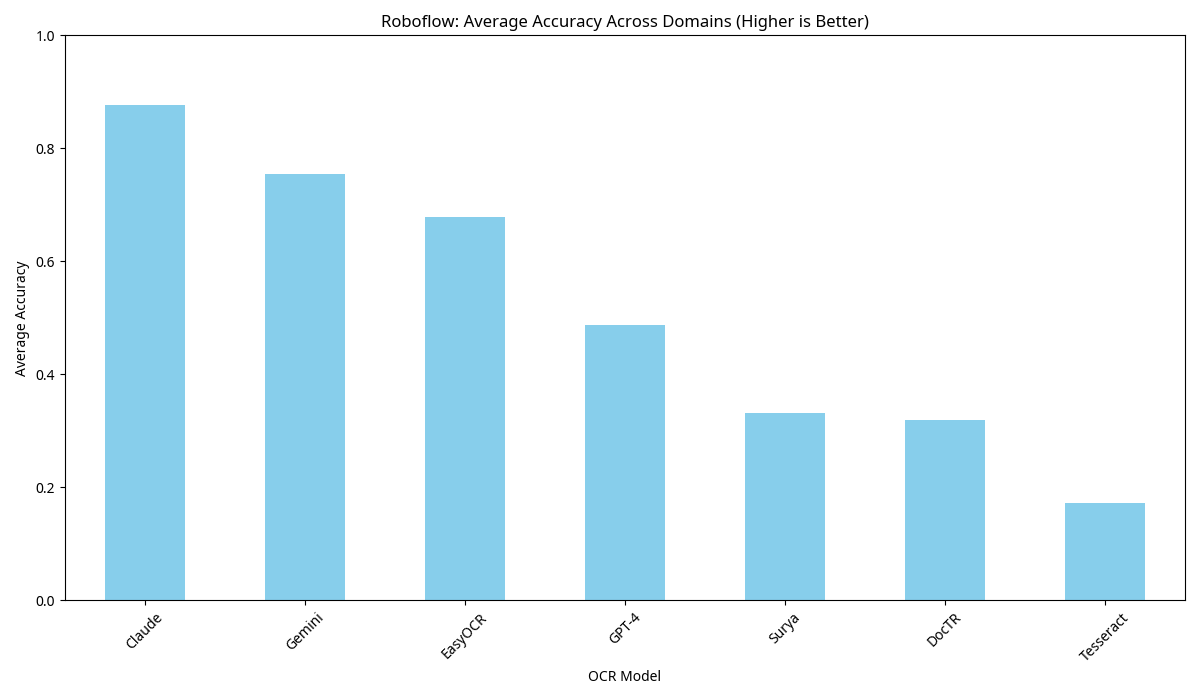
- Key Takeaways: Proprietary models like Claude and GPT-4 usually lead on overall accuracy, but open-source options like EasyOCR and some LLM-based models hold their own in specific domains. So the right choice depends on your use case.
OmniAI: JSON extraction accuracy
This benchmark from OmniAI focuses on the JSON extraction accuracy of open-source Vision Language Models (VLMs) for OCR. This is particularly relevant for tasks involving structured data extraction from documents.
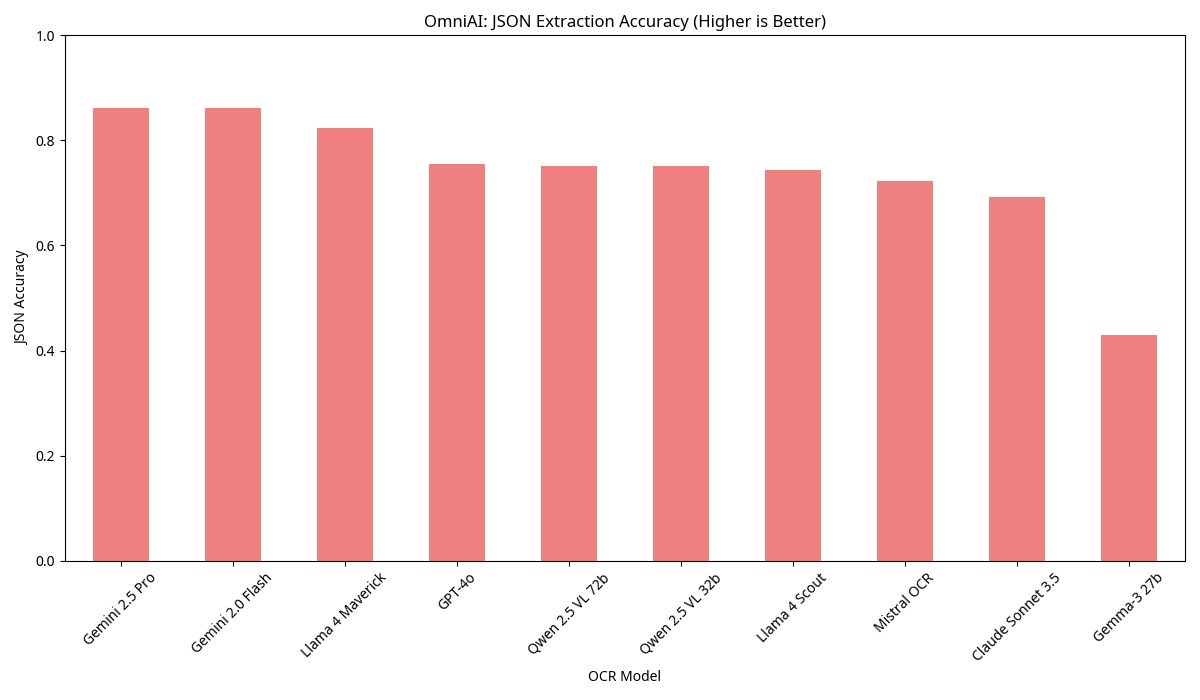
- Key Takeaways: Qwen 2.5 VL models (72B and 32B) show JSON extraction accuracy comparable to proprietary models like GPT-4o. Mistral-ocr also scores well on this task, a good result for open-source VLMs on complex document understanding.
Running models at home: power requirements and accessibility
One of the most appealing aspects of open-source and open-weight models is the possibility of running them on local hardware. The feasibility of this depends heavily on the model’s architecture and size.
CPU-Only Options: Traditional OCR engines like Tesseract run fine on standard CPUs, so almost any home computer can handle them. That covers basic text extraction from documents without specialized hardware.
GPU Acceleration: For more advanced models, especially those based on deep learning (like EasyOCR, PaddleOCR, and Transformer-based models), a dedicated GPU is highly recommended. NVIDIA GPUs with CUDA support are the most common choice, and the amount of VRAM (Video RAM) matters most. Models like TrOCR, Donut, and the smaller versions of Qwen2.5-VL and Llama 3.2 Vision can often run on consumer-grade GPUs (e.g., NVIDIA RTX 3060, RTX 4060, or higher with 8GB-12GB VRAM).
High-End GPUs for LLMs: The larger LLM-based OCR models (e.g., Qwen2.5-VL 7B/72B, Llama 3.2 Vision 90B) demand substantial VRAM, often requiring professional-grade GPUs like NVIDIA A6000, A100, or H100. While these are typically found in data centers, the continuous development of quantization techniques is making it possible to run larger models on more modest hardware, albeit with some performance trade-offs.
RAM and CPU: While GPU is often the bottleneck for deep learning models, sufficient system RAM and a capable CPU are still important for overall system performance, especially when handling large datasets or complex pre-processing tasks.
Where to get the models
Open-source and open-weight models are easy to get hold of. The main places to download them are:
GitHub: Many open-source projects host their code and pre-trained models directly on GitHub. You can clone repositories, follow installation instructions, and often find community support.
Hugging Face Hub: The Hugging Face Hub has become a central repository for pre-trained models, datasets, and demos across various AI domains, including OCR and VLMs. It provides easy access to model weights, documentation, and often includes runnable examples.
Official Project Websites/Organizations: Some models are directly distributed through the websites of their developing organizations (e.g., Meta AI for Llama models, Mistral AI for Mistral OCR).
Always refer to the official documentation and licensing information for each model to ensure proper usage and compliance.
Cost considerations and setup examples
Hardware costs for different setups
Budget Setup (CPU-only): $500-1000
# Install Tesseract (Ubuntu/Debian)
sudo apt update
sudo apt install tesseract-ocr
sudo apt install libtesseract-dev

# Python wrapper
pip install pytesseract pillow
Mid-range Setup (Consumer GPU): $1500-3000
# Setup EasyOCR with CUDA
pip install easyocr
# Requires NVIDIA GPU with CUDA support
High-end Setup (Professional GPU): $5000-15000
# Setup Qwen2.5-VL
pip install transformers torch qwen-vl-utils
# Download model (requires 20GB+ storage)
Cloud vs local deployment costs
| Deployment Type | Initial Cost | Monthly Cost | Pros | Cons |
|---|---|---|---|---|
| Local CPU | $500-1000 | $0 | No data transfer, full control | Limited performance |
| Local GPU | $1500-5000 | $30-50 (power) | High performance, privacy | High upfront cost |
| Cloud GPU | $0 | $100-500 | Scalable, latest hardware | Ongoing costs, data privacy |
Quick start code examples
Simple OCR with Tesseract:
import pytesseract
from PIL import Image

# Basic text extraction
image = Image.open('document.png')
text = pytesseract.image_to_string(image)
print(text)
Advanced OCR with EasyOCR:
import easyocr

# Initialize reader with English and German
reader = easyocr.Reader(['en', 'de'])
result = reader.readtext('document.png')

for (bbox, text, confidence) in result:
    print(f"Text: {text}, Confidence: {confidence:.2f}")
Document Understanding with Qwen2.5-VL:
from transformers import Qwen2VLForConditionalGeneration, AutoProcessor
from qwen_vl_utils import process_vision_info

# Load model and processor
model = Qwen2VLForConditionalGeneration.from_pretrained(
    "Qwen/Qwen2-VL-2B-Instruct",
    torch_dtype="auto",
    device_map="auto"
)
processor = AutoProcessor.from_pretrained("Qwen/Qwen2-VL-2B-Instruct")

# Prepare messages
messages = [
    {
        "role": "user",
        "content": [
            {"type": "image", "image": "document.png"},
            {"type": "text", "text": "Extract all the key information from this form"}
        ]
    }
]

# Process for inference
text = processor.apply_chat_template(messages, tokenize=False, add_generation_prompt=True)
image_inputs, video_inputs = process_vision_info(messages)
inputs = processor(
    text=[text],
    images=image_inputs,
    videos=video_inputs,
    padding=True,
    return_tensors="pt",
)

# Generate response
generated_ids = model.generate(**inputs, max_new_tokens=128)
generated_ids_trimmed = [
    out_ids[len(in_ids):] for in_ids, out_ids in zip(inputs.input_ids, generated_ids)
]
output_text = processor.batch_decode(
    generated_ids_trimmed, skip_special_tokens=True, clean_up_tokenization_spaces=False
)
print(output_text)
Conclusion
Open-source OCR now covers everyone from students to large enterprises. A student can run Tesseract on a homework project, a startup can build document processing with EasyOCR, and an enterprise can deploy Qwen2.5-VL for document understanding. There is a setup for every need and budget.
Key takeaways
- Start simple: begin with Tesseract or EasyOCR for basic needs, then scale up as requirements grow
- Consider total cost: factor in hardware, power consumption, and development time, not just model performance
- Match hardware to needs: don’t over-engineer your solution; a CPU-only setup might be sufficient for many use cases
- Test before committing: most models offer free trials or demos, so always test with your specific data before making decisions
- Stay updated: the field evolves rapidly; what’s cutting-edge today may be standard tomorrow
Open-source models have taken advanced OCR out of the hands of a few large companies. With the right model choice and setup, you can build document processing that compares with what enterprises run. The field moves fast, and that keeps the entry point low.
Sources
[1] Roboflow. “Best OCR Models for Text Recognition in Images.” Roboflow Blog. https://blog.roboflow.com/best-ocr-models-text-recognition/
[2] Modal. “8 Top Open-Source OCR Models Compared: A Complete Guide.” Modal Blog. https://modal.com/blog/8-top-open-source-ocr-models-compared
[3] OmniAI. “The best open source OCR models.” OmniAI Blog. https://getomni.ai/blog/benchmarking-open-source-models-for-ocr
[4] Tesseract OCR. https://github.com/tesseract-ocr/tesseract
[5] Jaided AI. “EasyOCR.” https://github.com/JaidedAI/EasyOCR
[6] PaddlePaddle. “PaddleOCR.” https://github.com/PaddlePaddle/PaddleOCR
[7] Mindee. “docTR.” https://github.com/mindee/doctr
[8] Microsoft. “TrOCR: Transformer-based Optical Character Recognition with Pre-trained Models.” https://www.microsoft.com/en-us/research/publication/trocr-transformer-based-optical-character-recognition-with-pre-trained-models/
[9] Clova AI. “Donut.” https://github.com/clovaai/donut
[10] QwenLM. “Qwen2.5-VL.” https://github.com/QwenLM/Qwen2.5-VL
[11] Meta AI. “Llama 3.2: Revolutionizing edge AI and vision with open models.” https://ai.meta.com/blog/llama-3-2-connect-2024-vision-edge-mobile-devices/
[12] Mistral AI. “Mistral OCR.” https://mistral.ai/news/mistral-ocr
[13] Moondream. “Moondream.” https://moondream.ai/
[14] Hugging Face. “Idefics2.” https://huggingface.co/HuggingFaceM4/idefics2-8b